Showing posts with label Photography. Show all posts

Friday, July 15, 2011

Pocket Sidekick

This is Kick*, the youngest member of the Harvard family.  I saw them a few weeks ago and got in a good photo shoot with her.  She was super cooperative and loved having her picture taken!
*Not using real names for the family


Thursday, May 19, 2011

Photography Lesson VI - Using Reflections

Reflective surfaces can be a great photography tool. They come in both natural (water) and manmade (mirror) forms. Not only can they add an interesting element to your photos, but they also boost the amount of light in your picture. These surfaces can be used as a basic aspect of your photo, or alone as an artistic shot. Here are a few examples ~


I took this photo during a walk through my neighborhood (yes, I sometimes bring my D5000 on exercise walks with me). The road wasn't particularly visually interesting, though it's pretty curvy, so when I saw the mirror attached to a telephone pole I knew it would make a great, artsy shot. Because I couldn't move the mirror, I had to angle myself and my camera so the road lined up in the mirror. The result is a fun shot using an unusual method.


Here's another example of using a manmade reflective surface. I took this photo during a snowmobiling outing in Lake Tahoe. I had gotten a bunch of great shots of the scenery and noticed how the gorgeous blue sky was reflected in Gilda's helmet. I thought it would be fun to get a picture of it and I also knew that my reflection would be captured too. Since a photographer isn't often the subject of many photos, this was a nice bonus. I guess that's how many people see me anyway, with a camera pressed to my face. I love that I captured me, Richard, the sky and landscape all in one shot. I also like that I used the helmet to achieve this because it gives a real feeling for what we were doing.


This is a picture from my cousin's wedding in Texas of the river that ran beside the resort. I liked that both the trees and sky were reflected in the river. It really gives a feeling for how calm the water was and how relaxing the experience was.


This was another shot that was purely for artistic expression. The clouds that day were almost cartoon-like in their fluffiness against the clear blue sky. I saw the puddle on the ground and thought it would be fun to picture the sky reflected in it. The result is what looks like a puddle full of sky and clouds.


This shot of the Golden Gate Bridge, taken from the Marin Headlands, is another example of using water to reflect light. As you can see, it was a cloudy day, so the light was diffuse and was reflecting nicely on the water of the Bay. It also meant that the shadow of the bridge span was cast on the water very distinctly. I made sure to adjust my settings in this shot so that the dark and light areas of the clouds were defined and the same was reflected in the water.


This photo of the Washington Monument and Capitol Building was taken from the Lincoln Memorial and I felt that it was important for me to capture the reflecting pool as well. See, even the architects of D.C. knew the importance of reflective surfaces. In this instance (a dark night shot) the reflection was also important because it nearly doubled the amount of light in the shot.

So, now you know how to use reflective surfaces to make your photos more interesting. When dealing with these surfaces and how they interact with your light source, you may have to adjust the settings on your camera to maximize the effect. Just mess around with it!

Wednesday, May 11, 2011

Serious Cuteness

I hung out with Hayden for a few hours this weekend and, of course, brought my camera.  Could this kid be any cuter?  (And the green stuff on his face is avocado.)


Monday, May 2, 2011

Photography Lesson V - Taking Advantage Of Every Moment

When setting out to take a picture, I usually try to visualize what I would like to capture. This is especially true when I am planning a professional shoot. However, plans change quickly, so it is important to not get too attached to what you had planned and instead look for moments to take take advantage of. A good way to accomplish this is to always have your camera ready. After you set up a shot and take a few photos, don't sit back and congratulate yourself. Keep your camera ready for a happy accident, should one occur. Here are a few examples...


This photo is part of Hayden's newborn shoot. I knew I wanted to get some naked photos of him, so I laid his little sleeping self out on a dark blanket on the couch. (The dark blanket was to create a uniform background, as well as to show off his pale newborn skin.) I had gotten a few shots, then he whimpered a little. His Daddy was sitting next to him and sort of absentmindedly reach down to soothe Hayden. At the same moment, Hayden reached his little hand up towards his Dad's. Since I had my camera ready I didn't have to say anything to his Dad about keeping still, or really even mention that I was taking a few shots. The result is that his hand looks relaxed and natural on Hayden and his parents know the photo wasn't staged. This is a true father-son moment caught on film. Having his father's hand in the photo also helped give a little perspective on Hayden's size. Perfection!


Here's another example of a happy accident. This photo of Javan and Karen in an open top bus in Washington, D.C. was only partially staged. I asked them to turn around to get a photo, which they did. However, between the time I asked them to turn around and the time I got my settings right (about 30 seconds), my cousin became too exhausted to hold his head up, poor baby. He said I was taking too long. the result is actually better than the shot I had planned. It captures Karen's sunny personality and easy smile as well as Javan's, well, Javan-ness. It also captures how tired we all were after getting up very early to go to the Rally to Restore Sanity, then standing for many hours at the rally.


Finally, here's the ultimate example of a happy accident. When I took this photo I had only owned my D5000 for about a week and was just photographing Arrow to see the quality of the photos it could take. Arrow was lying on the deck in the bright summer sun, just enjoying himself. It was warm so he was panting when he looked up at me. It just so happened that when I snapped the photo he closed his eyes against the sun and "smiled" a bit wider. Luck is what this shot is all about. Without good luck, my photography company wouldn't be called Smiling Dog Photography and Arrow wouldn't have a signature picture.

There's not much I can say that will help you improve your luck (but maybe go outside, turn around three times, and spit just to be sure). All I can do is help you recognize opportunities for great photos and not see them as getting in the way of your plans. I can also tell you not to over-plan and to have your camera ready to take advantage of every situation.

Here are a few more examples of a captured moment rather than a planned photo. There's not really anything to explain, they are just here to give you a few more ideas.


Friday, April 15, 2011

Photography Lesson IV - Lighting

The actual lighting of any situation is usually out of your control. If you are inside you may be able to turn on a few more lights, but if you are outside all the lighting control is going to happen in your camera.

The beauty of putting your D-SLR camera into Manual mode is that you can adjust for a certain light, and adjust within a certain light. Again, these adjustments will involve changing your ISO, Shutter Speed, F-Stop, and White Balance like we talked about in the second Photography Lesson.

Adjusting for a certain light is pretty self explanatory and is what I talked about in the second post. This involves changing the Manual Settings until your picture looks lit correctly. Adjusting within a certain light is what I will talk about here and it is what will give your photos a bit more of inartistic flair. Adjusting within light will help you play up shadows, create silhouettes, highlight areas of a photo, and much more. Let's work with a few examples.

Using Low Light To Your Advantage


This photo was taken at my cousin's wedding reception. It was held at night in a large gazebo-like building which was lit by Christmas tree-esque lights. In this type of lighting situation your first instinct may be to use a flash. But you know that I don't like using a flash, and if I had here, I wouldn't have captured the same emotion in the picture. More importantly, I wouldn't have captured the actual moment, I would have captured some bright version of it. So, what I did was dial up the ISO, lower the F Number, slow down the shutter, and turn the WB to indoor light. The result of dialing up the ISO was more "noise" in the photo, but the slight blur from it gives the picture a warm fuzzy feel (Collective "Awww").

Awkward Light Placement


A situation like this can be difficult to photograph. This is a picture of the iconic bagpiper at The Inn At Spanish Bay at Pebble Beach. Our rooms were right on the golf course and every evening the bagpiper (employed by the resorts) walked through the links playing and stopping at various locations. The problem with this lighting is 1) the light from the sunset is low, 2) to get the sunset in the photo the bagpiper had to be photographed on his shadowed side, and 3) if I tried to get the bagpiper well lit using my Manual settings, the sunset would be washed out. The solution was to embrace the idea of the bagpiper in silhouette. I upped the ISO, but not to the very top of the range, and adjusted the shutter and F Stop until the sunset's colors were ideally captured. Then I made sure I had a good angle on the bagpiper (turned to the side and actively playing). The result is a shot that is emblematic of the Inn as well as Pebble Beach Resort. 


This shot was taken on the same trip to Pebble Beach. This is Carmel Beach looking North. In this picture, I wanted to capture several things - the sunset, the peninsula, and the dead tree on the beach. I used the same camera method that I did with the bagpiper to get the color of the sunset without blacking out the other details. (Neither of these photos was edited with PhotoShop). You can see that, in terms of light, the sunset is brightest, the peninsula is dark, and tree and grass around it are black. This helps create a lovely layered look and is a result of where I was standing in relation to the light source. Here is another shot of a sunset creating a layered look:


Where Is The Light In Relation To Your Subject?


This picture was taken in the early evening, so the sun was low in the sky (on Arrow's right). The result of this light placement is that half of Arrow is dark and his shadow is long. For this shot I used a faster shutter (because Arrow was running), and I needed to raise the ISO to compensate. Take a look at where the light is coming from when you line up your shot. It's fun to see Arrow partly shadowed, partly sun drenched because you can really get a feel for the type of day it was. Here is a close up shot from the same time that really shows the shadows:


Getting Creative With Lighting


This shot of Baby B was taken on an outdoor deck early in the morning. The result was that there was a huge difference between the areas of sunlight and the shadows rather than a gradual change. What I did was set my camera to work for the lighter area, knowing that the shadows would be pretty dark (darker than they actually were). The light happened to be falling across his face at the time which created a fun, more artistic photo.
Take Advantage Of How Windows Funnel Light


In these photos of St. Peter's Basilica in Rome, a beam of sunlight is streaming in from the famous dome above. I'm sure this was intentional on the part of the architects because it is a church and the whole "light from above" thing is a big deal. I made sure to adjust my settings so the beam was defined instead of just looking like a bright area of light. Just play around with your camera, take a picture, look at it on the screen, then adjust accordingly. (Note: I did not have my D5000 at the time of this trip so the photos are not quite as good quality, but they were best for illustrating my point.)

Dark Situations - Use Any And All Light To Your Advantage


This picture of the Washington Monument, reflecting pool, and Lincoln Memorial was taken from the steps of the Lincoln Memorial at about 7pm. This was admittedly a difficult lighting situation for me. I was able to dial up the ISO, slow down the shutter, and open up the lens (F Number) to allow as much light to enter the camera as possible. I also took advantage of the reflecting pool because it nearly doubled the light. (Note: I am going to do a future post on how to use reflective surfaces.)
Aiming Your Camera Directly At The Sun


It isn't easy to take a photo with the sun directly in front of you because it can leave everything washed out. Also, if you are focusing on something in the foreground the subject will be in front of the sun and therefore in shadow. What I did to capture this was to use a low ISO number, fast shutter, and a mid range F Number. The result is that objects in the foreground look darker than they actually were, but since they were not my subject I was okay with that. The good thing about these settings is that the sun looks defined rather than just washing everything out. (Safety Tip: Looking through the viewfinder is my preferred photography method, but probably isn't the best idea for this type of situation. The probability of going blind goes down when you choose to look at the screen instead. I'm so stuck in my ways though, that I looked through the viewfinder and saw spots for a while. I was worried I would have to learn Braille. I'm thinking of doing a PSA about it. Oh well, I guess hindsight is 20/20. Pun intended.)

Now you know a little more about how to use the light in your environment to give your photos more personality. You can even take the same shot twice, but adjust your settings in between to get vastly different, and equally good, photos. Again, the best way to figure out lighting is by playing with your camera. Keep adjusting the settings between shots. I think you will enjoy getting to know your camera this way.

Next up - Taking advantage of little moments and not over-planning.


Tuesday, March 29, 2011

Photography Lesson III - Lining Up A Shot

Since we have gone over equipment and the basics of camera settings, then next logical topic is how to line up a shot so that you get the most out of your photos. People will notice how well a photo is lined up and how it draws their eye before they noticit that it is a little blurry or dark.  In fact, when the angle on a photo is perfect, little flaws can be played up as artistic.

Most people's photography needs fall into a category (like nature, the kids, pets, etc) that that is the main subject of the majority of their pictures. If you have children, you are probably going to be most interested in tips on children's photography. Same goes if you take mostly nature shots, or portraits. I will try to use examples and present info in a way so that everyone can benefit from it.

As I said in my last photography lesson, I use the viewfinder on my camera to take pictures rather than looking at the LCD screen. I find that it is easier to imagine what a picture will look like when I block out all other visual information. I can then review the photos on the screen when I'm done.

The first thing to ask yourself when lining up a picture is Why am I taking this picture? If you are photographing your child's soccer game, you are going to want to get a shot of your child with the ball or in action, right? This means you are going to want to zoom out a bit so you can get your child's body and the ball in the shot. A closeup of little Susie's face isn't what you are going for here. Makes sense, no? On the other hand, if you are trying to photograph the beauty of a rose, you are going to want to get in close to capture its intricacies. If you take a wide shot of a rose garden you will have a nice shot of a garden, but nothing extraordinary because the viewer's eye will not be drawn to any particular subject.


 And that is my next tip: ask yourself What is the subject of this picture? Your answer will probably be "My child kicking a soccer ball" and not "My child and five other kids on a soccer field". Keep in mind that the background of a picture can be distracting if the subject doesn't fit with it, or if the subject isn't placed well in it. Your eye tends to dart around looking for a subject to settle on, and if it can't, it will move on to something more interesting. Let's look at some examples.


Here is an example of an action photo where having the subject placed correctly in the frame is crucial. In this case, the background colors go nicely with the subject so they add to the photo rather than distract from the subject. It was also important for the photo to be in portrait (up and down) format. This layout minimizes the amount of uninteresting background and makes Arrow look longer and the jump more spectacular. It allows more sky and ground immediately around him to be shown. You can see that Arrow is nicely centered in the picture. Given that the background is pretty, but not particularly relevant to the subject of the photo, having the subject centered made the picture more visually appealing. The next example is the opposite.


When lining up this shot I felt that it was important to capture as much of the background as possible without minimizing the subject. It would not have been very interesting to see Richard against a white snow background without any of the context that the trees bring. This photo was taken from the top story deck of the house in Lake Tahoe. The height was crucial in getting the right angle for this shot. Richard had just sledded down the hill and was climbing back up for another go. I loved that he was wearing all black (even though the doofus was in short sleeves) because it played so well against the snow. I could have panned a bit right to center him in the lower half of the frame, but sometimes an off center subject is best. I chose to anchor him in the bottom right of the shot because it accentuated the fact that he was walking uphill. (It can be helpful to think of your subject as the anchor of the picture. It makes the subject seem weightier and helps you visualize the shot before you take it.) NOTE: The color was edited in PhotoShop to make it black and white while keeping the color of the sled. I will explain how to do this in a future Photography Lesson.
In the Arrow photo I sat on the ground to accentuate the height of the jump. In the photo of Richard I climbed up to take the picture from above to get a lot of background in and to highlight the uphill journey.  Here is another example of the importance of the height you take a picture from.


For this photo of Hayden I had him lie on the ground on his tummy with his arms over his boppy pillow. Because this put him low to the ground, I needed to get even closer to the ground than sitting on it would have allowed. So I got on my tummy too, propped on my elbows, and got him centered in the frame. If I had been sitting I would have gotten more of the top of his head than his face. Once I was set up I shook a toy in my left hand out of frame to get his attention (and apparently Bodie's too if you look in the background). I will do a Photography lesson on the best ways to engage your subject a little later (I sure am making more work for myself!)

Using your surroundings to frame a subject and make the photo more visually interesting is my next tip. Here are a few examples. Each of these photos would have been very different if I had pushed in past the closer objects instead of using them as a frame.


This walkway at Pebble Beach is pretty, but by taking the photo through an opening in the sheer curtains the photo becomes more interesting. The colors seem more vibrant and the curve of the sidewalk looks more pronounced.


For this photo of a vineyard, instead of zooming in past the stone archway I pulled back and let the arch create a natural frame. The archway acts like a funnel directing the viewer's eye to the vineyard.


This picture of the valley with the circular frame is an example of looking around you to see what might make your picture more visually appealing. Any ideas about how I achieved this? Well, the photo was taken through a knothole in a fence. I got up close to the fence, focused on the landscape, and the fence created a creative frame. Again, the viewer's eye is directed to the subject (the view) and any extraneous visual information is blocked by the fence.


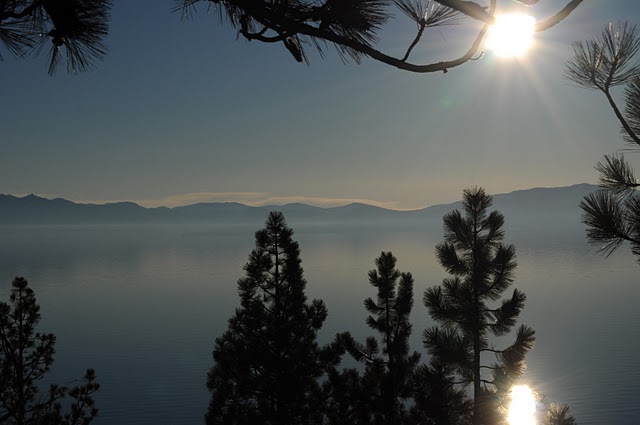
Finally, for this photo at Lake Tahoe instead of avoiding this location because of all of the branches in the way, I used the branches in the foreground to frame the shot. Many times objects in the foreground can accentuate the background of your pictures as well as add context.

Now, let's talk about getting really creative with the placement of your subject. Sometimes it is fun to place the subject of your photo in a wacky spot in the frame.


This picture of Arrow is fun because the background is blurred out and his eyes draw yours. Don't dismiss a photo like this, even if it was an accident.


For this photo Baby B I pushed in really close to focus on his amazing blue eyes and precious lips. I have other pictures of his whole little self, so I wanted one that would accentuate the details.

The same can be said for the following photos of Hayden.  I got some great photos of his face, or all of him, so I wanted to capture some of the finer details. Take a little time to pick out the details of your subject. For Hayden I chose his sweet hands, mouth, toes and eyelashes. I did this because he was 4 months old and I knew that his parents would want to have some pictures to remember the little baby things that change so quickly.


Final tip: sometimes the subject isn't what you think.


In this photo, the little girl's face doesn't matter. The emotion in the photo comes from her little hands pressed against the store window.  Think about what you are trying to convey with the photo.


The same is true for this photo of the sisters at the piano. The emotion of the photo comes from seeing their little backs squished in together (the older ones framing the baby) and from the two sisters looking at each other. We got some great shots of their faces that day, so their faces weren't important here. We know who they are. The emotion is the key (both what is shown and what is evoked).

Here is the final example: Javan and Karen in Washington, DC. Here I didn't want to take a portrait of them holding hands. I wanted to capture the moment. The visual of them holding hands walking down the tree lined sidewalk is best presented from the back. Not seeing their faces leaves the emotion entirely in their body language.  I like to think that one day their grandchildren will really like this photo too.


So that is a little lesson on framing your photos and lining up your shot. This post doesn't address lighting, staging, taking advantage of the moment, or many other factors that I will address later. The point of this was to help you broaden the way you arrange your shots. Play around with this and I think you will be pleased. Think about what you are going for, but don't over think it (make sense?). Some of the best photos are happy accidents.

Next lesson: Lighting - Sometimes it's okay to cross to the dark side.